FlowFuse 2.26: Bringing access-controls to your MCP nodes
FlowFuse 2.26: Bringing access-controls to your MCP nodes
With the holiday break sitting in the middle of this release cycle, it's a smaller release than usual this month. But that hasn't stopped us continuing to make the FlowFuse Expert even more useful.
Role-based access control for your MCP tools
Following on the the introduction of FlowFuse Expert MCP-Powered Insights we have added annotations to the FlowFuse MCP nodes and linked them up with the FlowFuse roles. This permits a level of control over who can access what. This is just a first step, we will be working in the area over the next few iterations.
The MCP nodes now allow you to set some standard annotations to give the platform a hint as to what type of action the node performs. This lets you separate tools that provide read-only information from those that make potentially-destructive changes.
Within the FlowFuse team, you can then use the granular RBAC feature to configure what users have access to the different types of node.
For example, Viewer role users can have access to read-only nodes, whilst Owners get to access the full range of tools. These roles can be customised for each Application within the team.
The annotations we apply are part of the MCP standard, so will be recognised by your own Agents and LLMs.
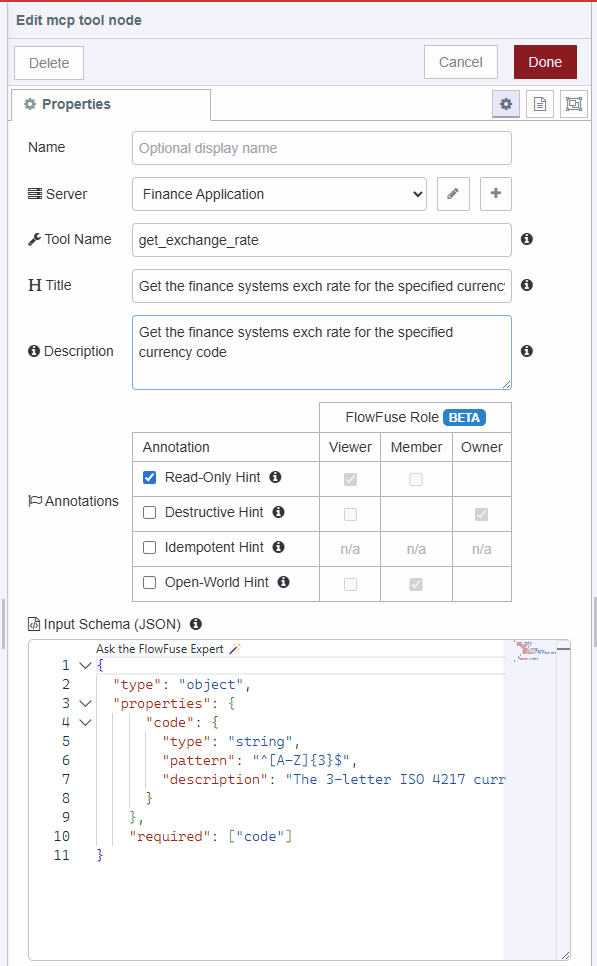 MCP Server Tool Node with new annotations
Integrating FlowFuse Expert with Node-RED
This release also brings some new abilities for the FlowFuse Expert to help you do things inside Node-RED itself.
- Streamlined Node Installation: When the Expert suggests a node module, it can now automatically open the Palette Manager and filter for the correct package, leaving you just one click away from installation.
- Direct Flow Imports: When the Expert provides demo flows, you no longer need to copy-paste JSON. The Expert can now inject those flows directly into your editor, ready for deployment.
Make sure you've updated the @flowfuse/nr-assistant module inside your instance to unlock these new capabilities.
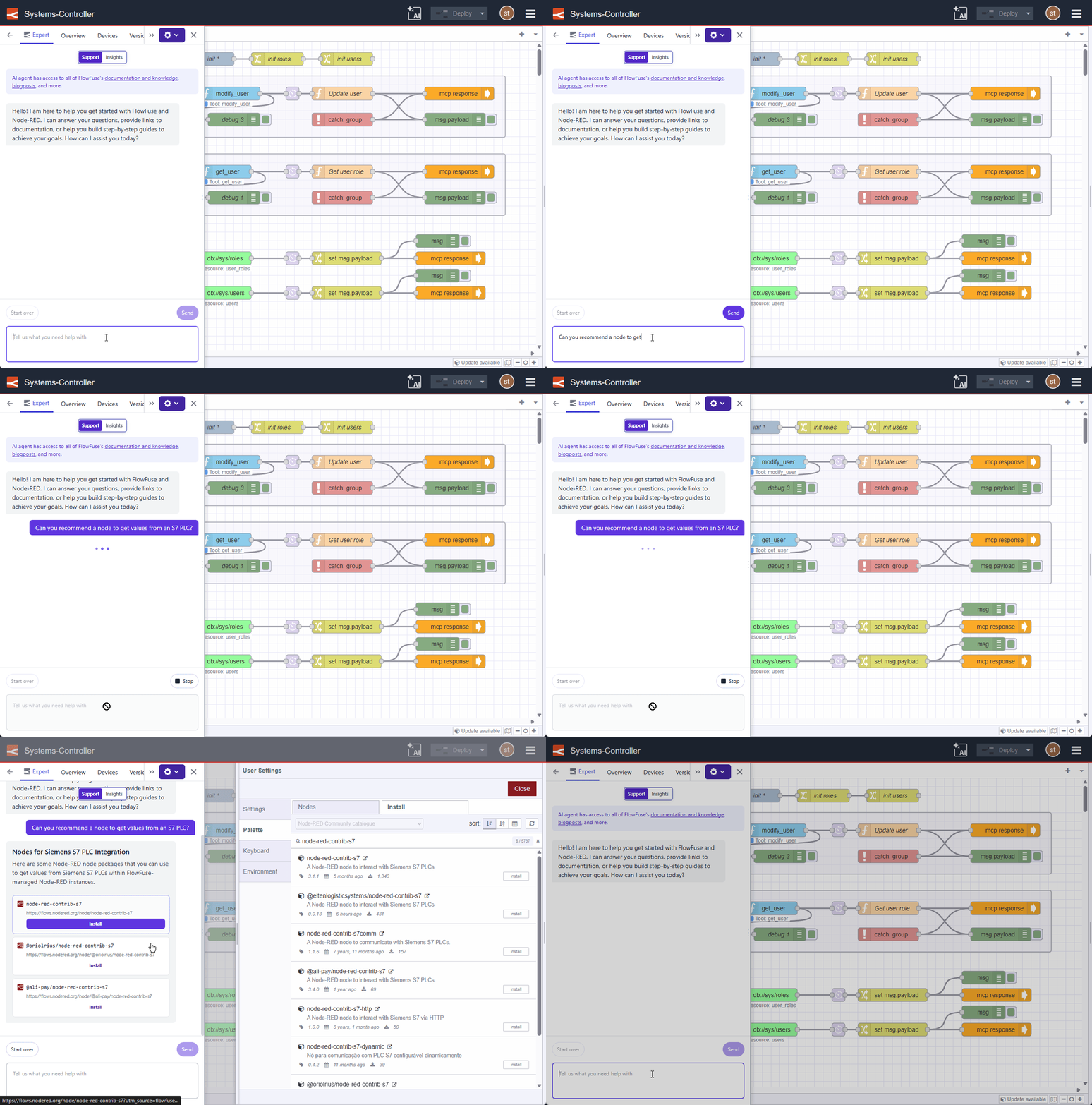 FlowFuse Expert integration with the Palette Manager
What else is new?
For a complete list of everything included in our 2.26 release, check out the release notes.
Your feedback continues to be invaluable in shaping FlowFuse's development. We'd love to hear your thoughts on these new features and any suggestions for future improvements. Please share your experiences or report any issues on GitHub.
Which of these new features are you most excited to try? Reach out on GitHub or social media!
Try FlowFuse
FlowFuse Cloud
The quickest way to get started is with FlowFuse Cloud.
Get started for free and have your Node-RED instances running in the cloud within minutes.
Self-Hosted
Get FlowFuse running locally in under 30 minutes using Docker or Kubernetes.
Start building with your own industrial data
Connect your systems, automate workflows, and see what’s possible in your environment.
About the Author
Nick O'Leary
CTO
Nick is the founder/CTO of FlowFuse. He created Node-RED in 2013 and continues to lead the project today. He has worked on projects ranging from smart meter energy monitoring to retrofitting sensors to industrial manufacturing lines with Raspberry Pis and Arduinos.
On this page
Related Articles:
- FlowFuse 2.29: FlowFuse Expert Comes to Self-Hosted Enterprise
- FlowFuse 2.24: FlowFuse Expert in the Node-RED Editor, Scheduled Updates, Simpler Edge Device Addition, Store and Forward Blueprint, and what's next!
- FlowFuse 2.23: MCP and ONNX nodes, FlowFuse AI Expert on the homepage, Application-level Permission Control, FlowFuse Expert for Self-Hosted, and more!
- FlowFuse 2.21: AI-Assisted SQL, Low-Code Custom Nodes, and Remote Instance Performance Insights
- FlowFuse 2.20: AI-Assisted Node-RED & New Database Service