Import Node-RED Flows During Remote Instance Setup
← Back to the Changelog
FlowFuse Device Agent now supports importing Node-RED flows during the setup process. This feature streamlines the configuration of your Remote Instance by allowing you to:
- Select an existing Node-RED flows directory from your device.
- Choose a specific flows file to import.
- Automatically import associated credentials and package files.
How it works
- Setup Command: Run the setup command provided in the FlowFuse interface.
- Flow Selection: During setup, you will be prompted to import existing Node-RED flows. Options include:
- Skipping the import.
- Selecting a default Node-RED directory (e.g.,
.node-red). - Specifying a custom path.
- File Selection: If a directory is selected, you can choose a specific flows file to import.
- Automatic Import: The Device Agent will handle importing credentials, package files, and generate a snapshot to the FlowFuse Platform, setting it as the "Target Snapshot" for the device.
Notes
- When your Remote Instance is started, it will install all the necessary pieces and run your new Snapshot.
- The Remote Instance must be assigned to an application before running the Setup Command
- Requires Device Agent v3.3.1
- Available on FlowFuse Cloud today. For self-hosted customers, you'll need FlowFuse version 2.17
Screenshots
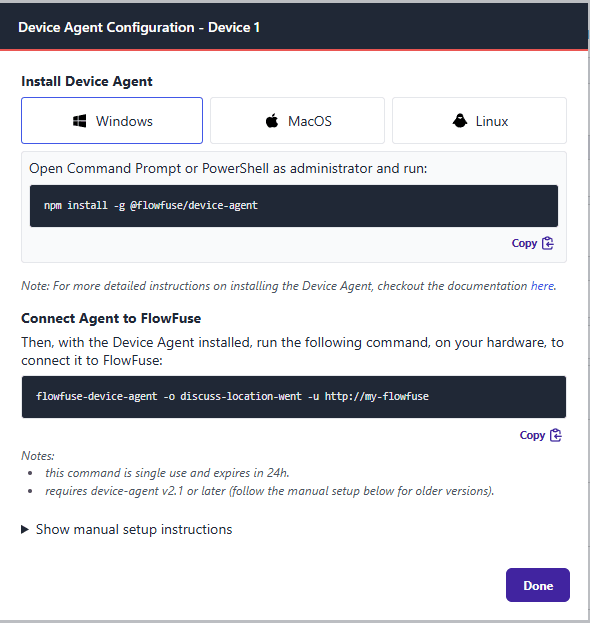 Screenshot of the FlowFuse interface for configuring a Remote Instance
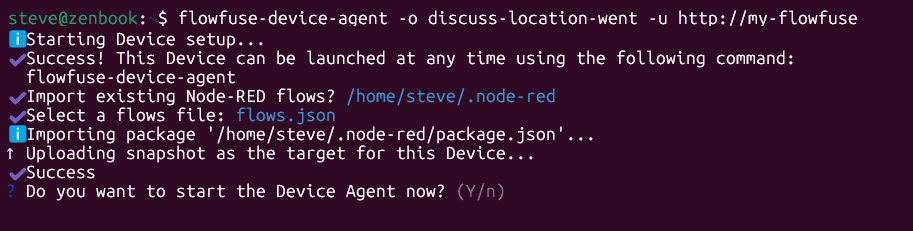 Screenshot of the new import options in the Device Agent during setup
We hope this enhancement simplifies the process of migrating existing Node-RED flows to FlowFuse.
Written By:
Steve McLaughlin
Published on: